Best M.2 NVMe for the UGREEN NASync iDX6011 Pro
 By Devin Chua · Data checked by Owen Nakamura · Updated
 On the UGREEN NASync iDX6011 Pro, NVMe is where the AI models belong: its 2 SSD slots take M.2 NVMe drives up to 8 TB each. A model loads in seconds from NVMe and in minutes from the hard drives, but once loaded it runs from RAM, so the SSD speeds up loading, not chatting. UGREEN locks no NVMe brand; any PCIe 4.0 drive with a real endurance rating works.
As an Amazon Associate we earn from qualifying purchases on Amazon.ca.
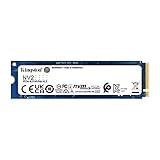
M.2 NVMe for the iDX6011 Pro, from Amazon.ca
Fit not confirmed by UGREEN
Physical fit for the iDX6011 Pro: an M.2 2280 NVMe drive in its 2 M.2 slots. Every drive below matches that. UGREEN does not publish enough to confirm any of these for the iDX6011 Pro (UGREEN does not publish the M.2 slot length), so none is listed as compatible. Check the part against your unit, or UGREEN’s support, before buying.



How we check fit, and what UGREEN publishes for the iDX6011 Pro: iDX6011 Pro compatible drives and fit rules.
Keep AI models on NVMe, not on the drive pool
A local AI server reads the whole model from disk every time it loads one: at start-up, after a reboot, whenever you switch models. From the hard drive pool that is slow. RunAIHome estimates a 40 GB model takes 5 to 8 minutes to load from a hard drive, 70 to 90 seconds from a SATA SSD and 10 to 15 seconds from PCIe 4.0 NVMe, and cites a measured benchmark of 70-plus seconds on SATA against under 15 seconds on Gen 4 NVMe (RunAIHome, May 2026). Once a model is loaded it runs from RAM, so the drive changes how long you wait for the first word, not how fast the chat goes. On the iDX6011 Pro chat speed is set by memory bandwidth: Llama 3.1 8B runs at 3.7 to 20 tok/s as shipped, whichever drive it loaded from.
The iDX6011 Pro’s SSD slots, and what each is good for
UGREEN lists 2 M.2 NVMe slots at up to 8 TB each but does not publish their PCIe generation or lane count, so their real speed is unconfirmed. Any PCIe 4.0 NVMe drive will still load models many times faster than the hard drive pool; put the model library on one slot and keep the other for the system, containers or a cache.
| Slot | Takes | Link | Max throughput | Load 40 GB | Load Llama 3.3 70B |
|---|---|---|---|---|---|
| M.2 slot 1 | M.2 NVMe, up to 8 TB | not stated | n/a | n/a | n/a |
| M.2 slot 2 | M.2 NVMe, up to 8 TB | not stated | n/a | n/a | n/a |
Load times are theoretical minimums (model size divided by the link’s maximum), before runtime overhead; real loads take longer. Llama 3.3 70B (43 GB) is the largest model on our list the iDX6011 Pro runs comfortably at 64 GB.
How much NVMe for a model library
Everything on our list the iDX6011 Pro can run comfortably at 64 GB comes to 148 GB: Llama 3.3 70B, Qwen3 32B, Qwen3 30B-A3B, Gemma 3 27B, gpt-oss 20B, Qwen3 14B, Gemma 3 12B, Qwen3 8B, Llama 3.1 8B, Gemma 3 4B, Qwen3 4B, Llama 3.2 3B. An everyday set of four is 18 GB. Models come in new versions and several quantizations, so budget about twice what you keep: a 500 GB drive is the sensible size for the iDX6011 Pro’s model library.
Keep calculating
To see how much capacity is left after parity, the iDX6011 Pro capacity calculator is preset to its 6 bays and RAID types. For the iDX6011 Pro, the wider basics of choosing a drive are in the buying guides, and CMR versus SMR explains why SMR drives do not belong in a RAID array. Wondering what the iDX6011 Pro can actually do: Plex, Immich, Docker, local AI? See what the iDX6011 Pro can run.
Frequently asked questions
How many M.2 slots does the iDX6011 Pro have?
2. 2 × M.2 NVMe, up to 8 TB each; UGREEN does not state their PCIe generation or lane count.
Is an NVMe cache worth it in the iDX6011 Pro?
Only if you re-read the same data on the iDX6011 Pro: project files, photos, container images. A media library streamed once gains nothing, and with 2 × 10GbE (link-aggregable to 20 Gbit/s) the link is often the limit before the drive is.
Can I put any NVMe in the iDX6011 Pro?
UGREEN does not say. The iDX6011 Pro has 2 M.2 slots, but UGREEN does not publish the slot length or whether the slots can hold a storage pool rather than a cache, so we do not mark any NVMe drive as a confirmed fit. Check the slot in your unit before buying.
Can I put third-party drives in the iDX6011 Pro?
Yes. UGREEN locks no drive brand on the iDX6011 Pro; its compatibility list is guidance, not a gate.
Devin Chua works out which drives, RAM and NVMe cache fit which NAS model at nasdrives.ca, and what the RAID choice means for usable capacity, checked against what is in stock on Amazon.ca.
 Data checked by Owen Nakamura, Technical editor (data checking)