Best drives by NAS model in Canada
Updated · Prices checked
Fit CMR NAS drives rated for 24/7 use: Seagate IronWolf or WD Red Plus for most models, up to each model’s per-bay maximum. Pick your exact model below for a live CA$/TB drive table sized to its bays, the vendor’s drive-lock policy in plain English, and matching RAM and NVMe. Each model has a short note on why it fits and where it doesn’t, plus its current Amazon.ca offer. Where our Amazon.ca feed has no offer, we say so, and show the Amazon.com (US) price separately when there is one.
How to read this page
The NAS model decides two things about your drives: how many bays you fill and whether the OS has a flexible RAID (Synology’s SHR or TerraMaster’s TRAID) that lets you mix drive sizes without waste. Everything else (capacity, brand, CA$/TB) is the same decision across models, so start from your model, read the reason it fits your use, then size the array with the calculators. Below each model you get its availability from the Amazon listings we track: the Amazon.ca offer with its CA$ price and seller, or no current Amazon.ca offer with the Amazon.com (US) price in its own block where one exists. We only track Amazon; other Canadian retailers may stock a model we show without an offer.
UGREEN
UGOS Pro has no SHR, so on a UGREEN the drive plan is binding from day one: pick matched CMR drives and size the array once. The Intel models also transcode, so drive noise matters if the NAS lives in a living room.

UGREEN NASync DXP2800
The entry to the NASync line: two bays, but a full x86 base with two NVMe slots. The N100 transcodes Plex in 4K, and because UGOS Pro has no SHR, the drive choice here is especially binding.

UGREEN NASync DXP4800 Plus
The model putting Synology under pressure: 10-gigabit networking out of the box, up to 64 GB of RAM, four bays. To actually saturate the 10GbE link you need four quick CMR drives here or the NVMe cache, otherwise the drive is the limit, not the network.
UGREEN NASync DXP4800
The frugal version of the DXP4800 Plus: the same four-bay build, but the N100 instead of the Pentium and two 2.5-gigabit ports instead of 10GbE. For file storage and backup that is plenty; the 16 GB RAM ceiling is the real limit.

UGREEN NASync DXP6800 Pro
The flagship: six bays, a laptop-class i5, two 10-gigabit ports. In this class RAID 6 beats RAID 5, because six large drives make the rebuild the real risk. Enterprise drives like Exos are defensible here if you accept the noise.

UGREEN NASync DH4300 Plus
The affordable ARM version with four bays. The memory is soldered, so you decide once and for good at purchase: 8 GB stays 8 GB. That is exactly why the DH line is a file store, not a container platform.

UGREEN NASync DH2300
The cheapest NASync model and deliberately lean: 1-gigabit networking, 4 GB of soldered RAM, no Docker. Watch out for reviews that quote RK3588C, 8 GB and 2.5GbE: those are the DH4300 Plus specs, not the DH2300.

UGREEN NASync iDX6011 Pro
UGREEN's AI-first NAS: a Core Ultra 7 255H with Arc graphics and 64 GB of LPDDR5X soldered to the board, six bays, two M.2 slots, two 10GbE ports, Thunderbolt 4 and a PCIe Gen4 ×8 slot. There is one configuration and no memory upgrade, so the 64 GB decision is made for you; what you actually choose is the drives and the NVMe.
Synology
Since DSM 7.3 the 2025 models take ordinary IronWolf and WD Red Plus again, and SHR lets you mix drive sizes and grow one drive at a time: the most forgiving drive story of the four brands. Only M.2 NVMe is still tied to Synology's list.

Synology DiskStation DS925+
The model the whole drive debate revolves around. Since DSM 7.3 you can fit ordinary NAS drives again, and with SHR the DS925+ makes good use of mixed drive sizes. Do not overlook: unlike the DS923+ it has no slot for a 10-gigabit card, but it ships with two 2.5-gigabit ports.

Synology DiskStation DS923+
The predecessor many bought for the drive policy, and still the only four-bay DiskStation with a genuine 10-gigabit upgrade slot. The Ryzen R1600 has only two cores: strong as a file store with ECC RAM, weak for many containers.

Synology DiskStation DS423+
The price entry with four bays and SHR. The Celeron J4125 can transcode Plex with hardware acceleration, but the 2 GB of RAM out of the box is tight: the single free SO-DIMM is effectively mandatory and caps you at 6 GB.

Synology DiskStation DS224+
The best-selling two-bay DiskStation and enough for most homes. With two bays, RAID effectively means RAID 1: you pay half the capacity for fault tolerance, and SHR changes nothing with two equal-size drives.
Synology DiskStation DS1525+
Five bays is the interesting number: only from five drives does SHR-2 with double fault tolerance become economical without giving up more than a third of the capacity. Unlike the DS925+, the DS1525+ takes a 10-gigabit card.
QNAP
QNAP locks no drives, and if you run QuTS hero the pool is ZFS: plan it with the RAID-Z calculator, not the classic one. No SHR here, so mixed drive sizes waste capacity.

QNAP TS-464
The most interesting QNAP for self-deciders: the PCIe slot makes 10GbE an upgrade, and with QuTS hero the same box runs ZFS instead of ext4. If you choose QuTS hero, the RAID-Z calculator applies, not the RAID calculator. QNAP has no SHR equivalent: mixed drive sizes waste real capacity here.

QNAP TS-264
Two bays, but the kit of a bigger machine: two NVMe slots, two 2.5-gigabit ports and a PCIe slot. With only two drives, RAID 1 is the one sensible choice, which halves the capacity no matter how large the drives are.
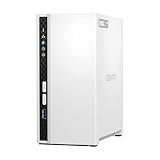
QNAP TS-233
The cheapest QNAP and deliberately modest: an ARM processor, 2 GB of soldered RAM, one gigabit port. The network caps you at about 110 MB/s here, so a faster drive buys no more speed. Buy on noise and price per TB, not on data rate.
TerraMaster
TRAID is the reason to care: like SHR it pools mixed drive sizes without waste, and the policy is fully open. Canadian stock is intermittent, so several models show a US listing below.

TerraMaster F4-425
The only alternative to Synology with a genuine SHR counterpart: TRAID uses mixed drive sizes, TRAID+ matches SHR-2 with double fault tolerance. If you have a stack of mismatched drives, you lose less here than with UGREEN or QNAP.

TerraMaster F2-425
The cheapest x86 two-bay with 2.5-gigabit networking. With two equal-size drives TRAID gives no advantage over RAID 1; it only gets interesting once you add a larger drive later.
Minisforum
An AI-first maker new to NAS: the N5 Pro pairs five bays with a Ryzen AI chip, two DDR5 slots and a U.2-capable SSD tier. No drive list and no lock, and no SHR equivalent, so buy matched CMR drives and put AI models on the NVMe tier.

Minisforum N5 Pro
A five-bay NAS built around a laptop-class AI processor: the Ryzen AI 9 HX PRO 370 with Radeon 890M graphics and a 50 TOPS NPU, two DDR5 SO-DIMM slots to 96 GB with ECC support, one 10GbE and one 5GbE port, and a U.2-capable SSD tier. It is the rare NAS where memory, not the CPU, is the upgrade that matters: fill both slots and local AI runs about twice as fast.
Not sure which drive size?
Size any model with the RAID calculator or work back from a target with how many drives do I need. For a brand-by-brand ranking with reasons, see the buying guides.